

Instead of manually copying damage reports between tenant messages, maintenance tickets, and vendor calls, build a property manager work order restoration workflow that records the incident once and routes it to a responsible person. Use the 2026 setup below to separate emergency contact, inspection requests, vendor acknowledgment, and confirmed restoration dispatch.
- A property manager work order restoration workflow must distinguish a sent request from confirmed dispatch.
- Phoenix Restoration Group provides 24/7 emergency restoration across Carlisle, Des Moines, and Central Iowa.
- Free inspections cover all services during business hours, 8am to 4:30pm, not around the clock.
- Keep access instructions, authorization, vendor acknowledgment, and status updates attached to the original work order.
Why this matters
A restoration ticket needs more than a damage category and a vendor assignment. The person receiving it needs the exact location, reported conditions, access arrangements, and someone authorized to make decisions. Without those details, sending a notification leaves the handoff unfinished.
Phoenix Restoration Group serves Central Iowa property managers who need 24/7 emergency water, fire, mold, or biohazard restoration. Review Phoenix Restoration Group when establishing your local restoration contact, then record that contact in your operating procedure.
The workflow below is a configuration template, not a claim that a particular software integration exists. Bold field and status names are suggested labels to create or map to equivalent fields in your system. Do not assume a property-management platform connects directly to a restoration provider.
For your 2026 procedure, make one distinction explicit: a work order records the problem; vendor acknowledgment establishes that someone received the request. Neither alone confirms that a crew has been dispatched.
Before you start
- System access: Have permission to edit work-order fields, routing rules, notifications, and assignees. If your platform lacks those functions, use the same process as a staff checklist rather than an automated connection.
- Contact and authority: Prepare a property directory, on-call contact, vendor contact, access procedure, and authorization policy. Phoenix Restoration Group offers free inspections for all services during business hours, 8am to 4:30pm; distinguish those requests from 24/7 emergency restoration.
- The critical gotcha: A successful notification does not establish vendor acceptance. Confirm the provider's accepted contact method before configuring delivery, and keep a named person responsible until the provider acknowledges the incident.
Do not make tenant photographs a prerequisite for urgent routing. Ask for images only when taking them is safe, and never send someone into a damaged area to complete a ticket. Immediate threats to people require emergency services, not a maintenance queue.
Work-order intake configuration
The intake record should describe what someone observed, not force the reporter to diagnose damage. A tenant can report water entering a room without determining the source, contamination, or restoration scope.
- Create a Restoration review category or map an existing damage category to the workflow. Keep unrelated maintenance tickets outside this route.
- Add Property address, Building or unit, Reporter callback, and Reported condition. Make location and callback information visible in the dispatch summary.
- Add Observed at and Source status. Record whether the reported condition is ongoing, stopped, or unknown without presenting the answer as a professional assessment.
- Add Access contact, Entry instructions, and Authorization contact. Store sensitive access credentials in your approved secure location rather than a broadly distributed notification.
- Add Photos or documents as optional attachments. Keep the original report intact when staff add later observations.
Expected result: The work order identifies where the incident is, who can answer questions, and what has actually been reported. An incomplete location or callback goes to staff review instead of disappearing into a vendor queue.
Keep descriptions literal. Write that water is visible near a ceiling fixture rather than declaring the electrical system safe. Record a reported odor without assigning a cause. The intake record informs assessment; it does not replace it.
Urgency and authorization configuration
Separate the service category from the routing decision. Selecting water, fire, mold, or biohazard describes the report; it does not, by itself, establish the correct response or authorize work.
- Create Emergency contact required, Inspection request, and Needs staff review routing values. Give uncertain reports an owner rather than silently treating them as routine.
- Write observable escalation criteria in your internal procedure. Examples include reported ongoing water entry or a change affecting safe access; immediate threats to people belong with emergency services first.
- Map Emergency contact required to your designated on-call person and the established emergency vendor contact procedure. Do not hold this route until office hours.
- Map Inspection request to a scheduling task. Record the provider's business-hours inspection window separately from emergency availability.
- Add Authorization status and Authorized scope. Record who approved the request and what that approval covers under your property's policy.
Expected result: Every eligible ticket has a routing decision and an accountable person. The record also distinguishes permission to request an assessment from permission to authorize additional work.
Choose the route by the reported condition
Use this routing comparison in your 2026 staff procedure. These are workflow choices, not guarantees about assessment, scheduling, or arrival.
| Route | Best for | Advantage | Limitation |
|---|---|---|---|
| Emergency contact | Reports requiring immediate restoration contact after safety needs are addressed | Reaches the designated emergency contact outside office hours | Contact alone does not confirm acceptance or arrival |
| Business-hours inspection | Assessment requests without a reported immediate emergency | Separates inspection scheduling from emergency handling | Must not delay an incident that needs emergency contact |
| Staff review | Unclear location, conditions, access, or authority | Gives uncertainty a named decision-maker | Becomes a bottleneck if nobody owns the review |
Do not route every mold report as a confirmed emergency, or every water report as routine maintenance. Ask about current conditions and apply your written escalation policy. When a report is unclear, the assigned person must clarify it rather than letting a category make the decision.
Vendor handoff and dispatch confirmation
Keep the ticket open until the receiving party acknowledges the request. An email delivery result, completed automation run, or assigned vendor field is not confirmation that restoration dispatch has occurred.
- Build a Dispatch summary from the intake fields. Include the work-order identifier, location, reported condition, callback, access contact, and authorization status.
- Send that summary through the provider's agreed contact method. If your system cannot support that method, create a staff contact task instead of assuming electronic delivery is accepted.
- Set Vendor status to Contact requested. Record Contact attempted at and assign a Handoff owner responsible for checking the response.
- Change the status to Acknowledged only after the provider confirms receipt. Record the contact person and the next agreed action.
- Use Dispatch confirmed only when the provider confirms dispatch. Record an arrival estimate only when the provider supplies one, and retain it as an estimate rather than a promise.
Expected result: Anyone opening the ticket can distinguish an attempted contact, an acknowledged request, and confirmed dispatch. The next shift does not have to reconstruct the handoff from separate messages.
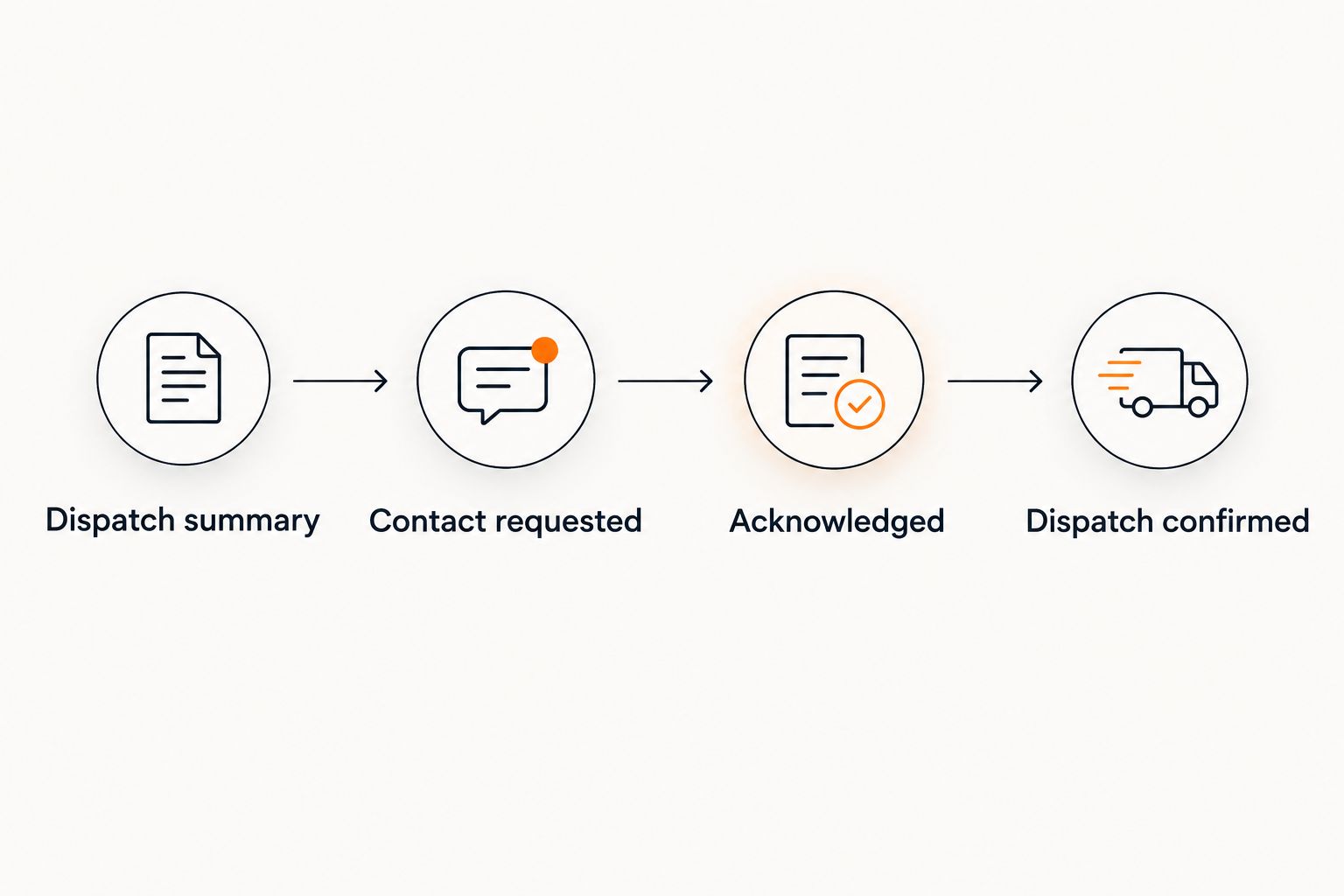
Agree on your internal escalation procedure before enabling automated notifications. Assign a backup owner and specify what staff should do when a contact attempt remains unanswered. Set review intervals through your own operating policy; do not invent a provider response commitment.
Status updates and closure configuration
Dispatch starts the service handoff; it does not finish the work order. Keep operational updates tied to the same incident so the property team can distinguish completed work from open decisions.
- Add Current action, Next action, Action owner, and Next update. Set the next update from an agreed checkpoint, not an assumed completion date.
- Separate tenant communication from vendor instructions. Tell occupants what affects access or use of the property without sharing unnecessary personal or incident details.
- Record changes to assessment, access, and authorized scope on the original ticket. Require the appropriate property representative to approve changes under your policy.
- Add Completion confirmation and Outstanding follow-up. Check unresolved repairs, documentation, and occupant questions before closing the record.
Expected result: The ticket shows what happened, what remains unresolved, and who must act next. A vendor update does not automatically close unrelated property-management tasks.
For broader service coordination, use the water damage restoration guide for property managers. Keep your 2026 work-order procedure focused on routing and accountability rather than trying to use it as a technical restoration manual.
Second workflow: escalate an updated work order
A routine inspection request needs a different route when the reported conditions change. Configure an update workflow alongside the new-ticket workflow so staff do not have to create a duplicate incident to get attention.
- Watch for changes to Reported condition, Source status, Access contact, and the routing value. Ignore unrelated edits such as formatting changes.
- Compare the updated report with the current route. If the new information meets your emergency-contact criteria, notify the on-call owner and begin the emergency contact procedure.
- Attach the changed information to the existing Dispatch summary. Clearly identify what changed so the recipient does not have to compare entire records.
- If the provider has already acknowledged the incident, send an update through the agreed channel rather than creating another initial request.
- Record acknowledgment of a material change when it affects the agreed action. Keep the existing incident identifier throughout.
Expected result: A changing incident receives renewed attention without creating competing tickets or duplicate dispatch requests.
Use the same logic when a tenant corrects a unit number or a manager changes the access contact. Route the correction to the person handling the incident, but do not treat every edit as a new emergency.
Troubleshooting
The same incident generates repeated vendor requests
Check whether every ticket edit restarts the initial-contact rule. Limit initial routing to the relevant category change or new incident, then use the update workflow for later information. Check the existing incident identifier before sending another request.
The ticket says dispatched, but nobody has confirmed it
Remove any rule that maps notification delivery directly to Dispatch confirmed. Return the ticket to Contact requested, assign the handoff owner, and obtain acknowledgment through the established contact method. Record dispatch only when it is confirmed.
A free inspection request is treated as an overnight appointment
Separate inspection scheduling from emergency contact in the request form and staff instructions. Free inspections are offered during business hours, 8am to 4:30pm. That window is distinct from 24/7 emergency restoration, and neither establishes a specific arrival time.
The provider cannot access the affected area
Check Access contact, entry authorization, and the current access procedure before completing the handoff. Have the property representative resolve missing permissions. Do not distribute entry codes through an unsecured notification to solve the problem.
Status updates disappear between shifts
Require the outgoing owner to record Current action, Next action, and Action owner on the ticket. Keep essential decisions out of private message threads. Assign unresolved work explicitly rather than assuming the next shift will notice it.
Customize your workflow
Start with a staff-managed handoff before automating every transition. Test a routine inspection request, an emergency-contact request, a missing-access case, and an updated incident. Confirm that each reaches the correct person without generating duplicate requests.
Phoenix Restoration Group provides restoration service and communication from initial assessment through cleanup. Best for: property managers in Carlisle, Des Moines, and Central Iowa coordinating water, fire, mold, or biohazard restoration. The practical limit for this workflow is clear: your property team must still define authorization, maintain access information, and confirm the handoff.
For your 2026 rollout, document the accepted contact method and escalation owner before enabling unattended routing. Software should carry the information; a named person should own unresolved decisions.
Discuss your restoration request
24/7 emergency restoration. Free inspections for all services during business hours, 8am to 4:30pm.
FAQ
How do I turn a property work order into a restoration request?
Capture the incident location, reported conditions, callback, access contact, and authorization status, then contact the provider through its agreed channel. Keep the ticket assigned until the provider acknowledges the request.
Does assigning a restoration vendor mean a crew is dispatched?
No. Vendor assignment records responsibility in your system; dispatch requires confirmation from the provider. Track contact requested, acknowledged, and dispatch confirmed as separate states.
Can I automate a property manager work order restoration workflow?
You can automate supported internal routing and notifications, but external delivery depends on your platform and the provider's accepted contact method. Use a staff contact task when no agreed electronic connection exists.
Does Phoenix Restoration Group offer emergency restoration outside business hours?
Yes. Phoenix Restoration Group provides 24/7 emergency water, fire, mold, and biohazard restoration across Carlisle, Des Moines, and Central Iowa. Free inspections for all services are offered during business hours, 8am to 4:30pm.
What should happen when damage gets worse after a ticket is opened?
Update the existing incident and reassess its routing immediately under your escalation policy. Send material changes to the responsible contact without creating a duplicate initial request.
Should tenant photos be required before contacting a restoration provider?
No. Do not delay urgent contact to collect photos or ask anyone to enter an unsafe area. Attach images only when they can be taken safely.
When should a property manager close a restoration work order?
Close the record after checking completion confirmation and assigning any outstanding follow-up. Dispatch or an interim vendor update does not establish that all property-management work is complete.
One last thing
The most useful automation can be the one that refuses to close a ticket. Require a recorded next action or completion confirmation before the workflow leaves an incident without an owner. That protects the handoff more directly than adding another notification.